The firmware for the TeHyBug 18650 Universal, Mini TeHyBug, GumBoard and — new since 1.0 — the TeHyBug Display Weatherstation has reached version 1.1.0. Two releases’ worth of changes are in it: a configuration interface rebuilt for your phone, a copy of it built into the device, a WiFi setup that hands you straight over to the configuration, and HTTPS certificate checking. Here’s what’s new for you.
📱 A configuration interface built for your phone
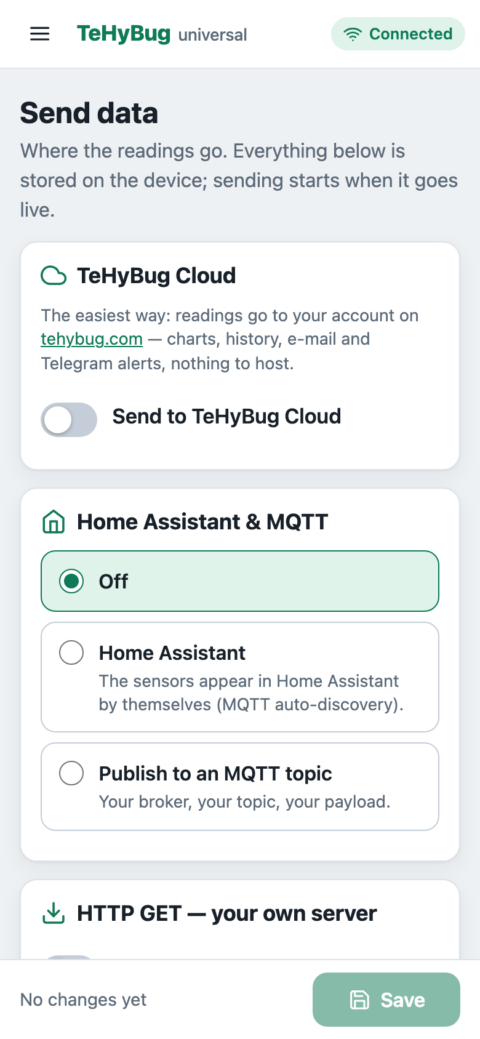
The web interface has been rebuilt from scratch. Everything you used to configure is still there, but it now works the way a phone app does — and it still needs no app, no account and no hub:
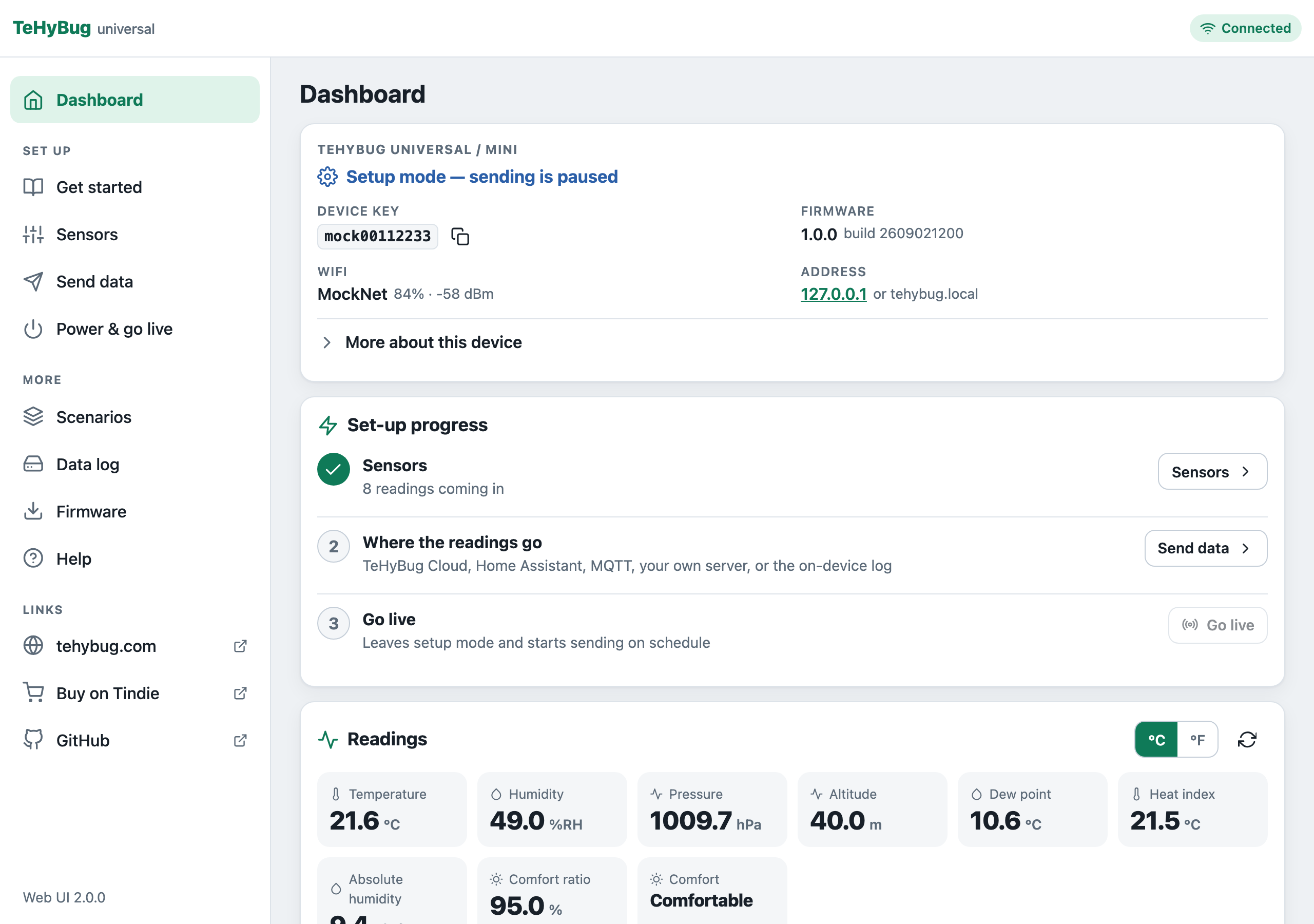
- A dashboard with a three-step set-up checklist — sensors, where the readings go, go live — that ticks itself off as you go, plus your live readings and the device log.
- Sensors are detected for you. The Sensors page shows what it found on the I²C bus at start-up; you only tell it what sits on the jack ports.
- “Fill from my sensors” builds the MQTT payload, the POST body or the GET query from the readings your device actually reports, in °C or °F. No more copying placeholder lists.
- Save only lights up when something changed, and tells you how many fields differ and whether saving restarts the device. An untouched page can no longer restart it by accident.
- Scenarios read as a sentence — “When Temperature is above 30 °C, then request a URL” — with the current reading shown right next to the threshold.
- Intervals with presets (1 min, 5 min, 15 min, 1 h) and a readable echo, so “900” reads as “= 15 min” before you save it.
- Go live opens with a checklist of readings and destinations, and stays greyed out until at least one destination is switched on.
- A Firmware page that checks for a newer release, lists the right download for your board and installs it from the phone.
Try it without a device: the live demo is a simulated TeHyBug (add ?board=display for the Weatherstation pages).
📦 …and it’s built into the device
Until now the configuration pages were loaded from tehybug.com, which meant a first setup on the device’s own access point — with no internet — showed a bare fallback page. The 2 MB builds (Universal, Mini, Display) now carry a minified, gzipped copy of the whole interface (about 44 KB) in flash. The device page still loads the online version when it can, so you always get the newest pages, and falls back to the built-in copy when tehybug.com is out of reach. Same pages, same features, no internet needed.
📶 WiFi setup that hands you over
- The WiFi chooser at
192.168.4.1now tells you where setup continues, and offers Skip WiFi → open the configuration if you want to set things up on the access point first. - After you save a network, the page shows the device’s new address on your network and then opens the configuration by itself — no more hunting for the IP in your router.
- Moving house, or to a new router? Power & go live → Change WiFi network restarts the device into the chooser. Nothing else is erased, and Exit keeps the old network.
🔐 Know who you’re talking to (HTTPS)
An https:// target was always encrypted, but the device could not verify the server. Now you can paste the SHA-1 fingerprint of your server’s certificate on the Send data page — one for all targets, or one per host — and the device refuses anything else. A Test the HTTPS targets now button checks the fingerprint against the real server before you save. Leave the field empty and nothing changes. The MQTT password is no longer shown in the configuration, either.
🕒 Clock, data log and alarms
- The clock sets itself from the internet (NTP) with your time zone — picked from a list pre-filled from your browser. The DS3231 module keeps the time in between; on a sleeping battery device the sync only runs while the clock is unset, so wakes stay short.
- Download the data log — each day’s file, or everything at once as a CSV (date, time, reading, value).
- On the Display Weatherstation, a ringing alarm stops by itself after five minutes, and the buzzer no longer clips the button clicks.
🖥️ One firmware for the Display Weatherstation too
Since 1.0.0 the TeHyBug Display Weatherstation runs its own build of this same firmware (tehybug.ino.display.bin) instead of a separate one: everything above, plus the clock page, three weekday alarms, night mode and an offline display mode. Your existing display settings carry over on upgrade.
✅ Reliability fixes
- The device confirms a save before it restarts, and answers with an error when a write to flash failed instead of pretending.
- The configuration can no longer silently outgrow its storage.
- Reading a DHT sensor no longer freezes the display for a moment.
- Placeholders now work in a scenario’s POST URL as well.
- The old (v1) web interface stays online for devices on earlier firmware; its Scenarios page had the wrong setting names since the C++ rewrite and is fixed.
How to update
⚠️ Only update when you need to. If your TeHyBug is working fine, there’s no need to chase every release — update when a new feature or fix actually matters to you.
Update over the air: put the device into config mode (RESET, then MODE within a second, until the LED turns blue), open its address in your browser and go to Firmware — it tells you which file your board needs; download it, pick it, install. On older firmware, open http://tehybug.local/update (or http://<device-ip>/update) and upload the file from the release page. Keep the device powered during the update; it reboots itself when done, and your settings are kept.
Prefer to flash over USB? Use BugZapper, the Arduino IDE, or esptool — see the documentation for details.
Compatible with the TeHyBug 18650 Universal (v1 / v2), Mini TeHyBug, GumBoard, the Display Weatherstation, and generic ESP8266/ESP8285 boards. First-generation 1 MB boards get the slim generic build: it has the new interface online, but no built-in copy and no HTTPS certificate check.
Questions? Tap the AI assistant on tehybug.com or check the FAQ. Turning ideas into smart devices.
Leave a Reply